
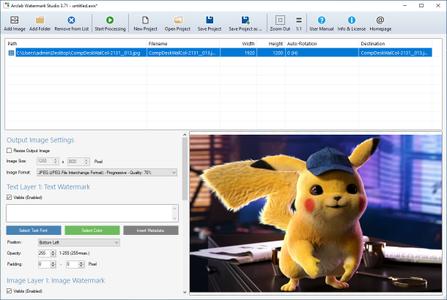
Arclab Watermark Studio 4.3.0 Portable | 4.5 Mb
Arclab Watermark Studio is an easy to use image watermarking software to add visible, multi-layered watermarks to photos and directory structures in a batch. It allows you to protect your photos from unauthorized distribution using multiple text- and image watermarks. The watermarking software can also can be used to create thumbnails, resize and convert images. There is only one click required to process a whole directory of images and photos.
Features:
Add multiple text- and image watermarks to your photos
Add true-transparency watermarks with custom opacity
Import image metadata EXIF/GPS to text watermarks
Place the watermark on multiple positions at once
Multi-layered watermarks
Batch processing of multiple files and folders
Supports jpeg metadata and camera auto-rotation
Resize and convert images (jpeg, png, tiff, bmp)
Save photos optimized for web pages in interlaced mode
Visible Watermark Photo Copy Protection
A watermark is a recognizable image, text or logo in an image or photography. Digital watermarking is the process of embedding information into an image. The information in the image or photo typically identifies the author or copyright holder. The main purpose for the use of visible digital watermarks is copyright protection and visual marketing. Arclab Watermark Studio is a watermarking software application for adding a visible watermark to images/photos.
Corporate Identity and Visual Marketing
If you post images on web blogs or publish news in the web, which includes illustration or photos, then it could be important to let the viewer know who has made the photo e.g. by adding your logo or web address in one of the corners of the picture. Its not only for copy protection, it also could drive attention and traffic to your website or company website.
Batch Photo Conversion
Having a large number of images, which should be watermarked, resized or converted? No Problem - you can process whole directory structures by a single click with our watermarking software. Add a watermark, change the image resolution, convert the image format with ease. The image conversion software support jpeg, png, gif, tiff, and bmp images and can convert the images into the image formats jpeg, png, tiff and bmp.
Operating System:Windows 7, 8/8.1, 10, 11
Home Page -
Code:
https://www.arclab.com/Recommend Download Link Hight Speed | Please Say Thanks Keep Topic Live

