
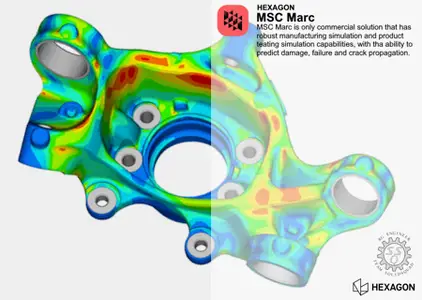
Free Download Hexagon MSC Marc 2025.1 | 1.7 Gb
Hexagon is proud to announce the release of MSC Marc 2025.1 is a powerful non-linear finite-element analysis solution to accurately simulate the product behaviour under static, dynamic, and multi-physics loading scenarios.
Marc 2025.1 offers significant enhancements from previous versions. Mentat has an improved user experience, the previous analysis state (also called pre state) has more capabilities, the hybrid contact formulation is updated, and we introduced a new subroutine for user-defined materials.
Hybrid contact formulation updates
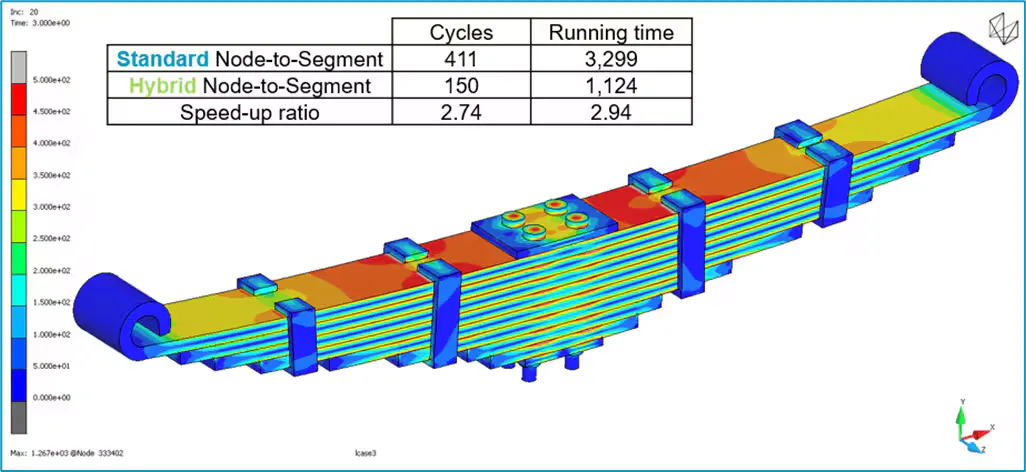
The recommended hybrid node-to-segment contact algorithm introduced in earlier releases is now set as the default for all new models for structural analysis (static or dynamic). This approach activates a double-sided contact formulation that primarily uses penalty-based enforcement, significantly reducing the need to manually distinguish between primary and secondary bodies. Compared to the previous node-to-segment method, users can expect improved accuracy, performance and robustness in most scenarios, along with reduced need to fine-tune contact parameters to achieve successful simulations. The hybrid approach supports now also the use of nodes on geometric contact bodies - a capability not available for other contact algorithms. This modelling flexibility is particularly beneficial for simulations involving manufacturing processes.
Close
Leaf Spring simulation using the hybrid contact algorithm
A new user material subroutine called UMATERIAL
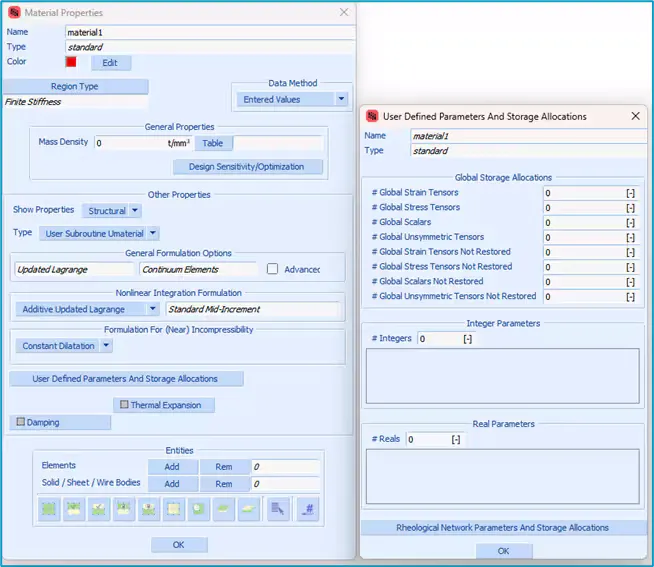
The HYPELA2 subroutine in Marc has long provided a way to define user materials when built-in models were insufficient for capturing complex mechanical behaviour. However, its use was often cumbersome, with limited documentation and few practical examples. In the 2025.1 release, Marc introduces a new and improved subroutine for user-defined materials called UMATERIAL, designed to offer a more accessible, flexible, and user-friendly experience.
With this new capability, engineers will:
- Benefit from a clearer and more intuitive user interface compared to HYPELA2
- Gain better control over near-incompressible and incompressible materials
- Choose from predefined nonlinear integration schemes
- Implement rheological multi-network models more naturally
- Focus on defining the deviatoric behaviour while Marc automatically handles the volumetric (bulk) response
- Access a set of utility routines designed to accelerate the development of custom material models
The overall user experience for defining custom materials is significantly enhanced. To get users started quickly, two practical examples are included in the user guide: a rubber-like material model and a material model incorporating metal plasticity. These examples serve as helpful references for efficiently developing and implementing a user-defined material behaviour.
Close
UMATERIAL subroutine related menus
Previous analysis state enhancements
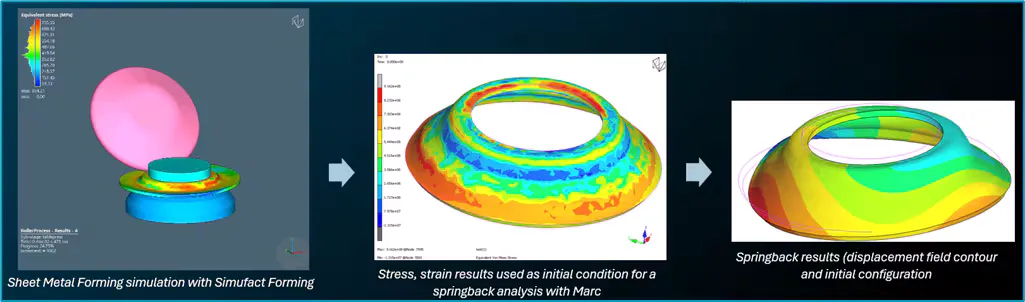
The pre-state functionality enables users to reuse simulation results as initial conditions for new analyses. In the Marc 2025.1 release, this capability removes previous limitations, such as when meshes differ between simulations and the HDF5 format support.
These improvements include:
- The ability to use multiple post files from various upstream analyses for defining the initial conditions for the downstream analysis, including .t16, .t19 files (both singles files and multiple files following an analysis with a domain decomposition), .h5, and .arc result files.
- Improved performance when using DDM
- The ability for the downstream simulation model to use a larger region than the model from the upstream simulation post files: portions that are outside will not be mapped
- Data mapping can be performed separately for different contact bodies
- Shell elements (including the solid shell) can be used with the general mapping option
Close
Simufact To Marc workflow example: sheet metal forming simulation results to be used as initial conditions with Marc for a springback analysis
User experience enhancements in Mentat
Based on your feedback, we have introduced features and usability improvements for both Marc and Mentat.
Lighting effect and triad
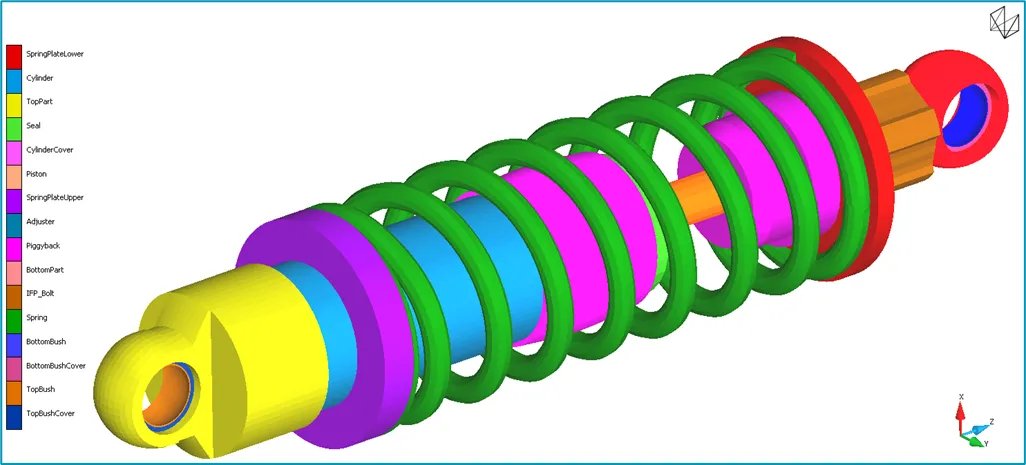
The lighting effect in Mentat improves the visual quality of 3D models for more realistic visualisation. By default, four directional light sources and one ambient (non-directional) light create a more pleasant and more clearly visualised environment. Further tailor the display by adjusting the number of light sources, their direction, colour, and the level of ambient contribution. The triad settings have been adjusted: a solid view is enabled by default for a more modern appearance
Close
Default lighting effects on a spring model using the new triad visualisation
Pre-processing enhancements
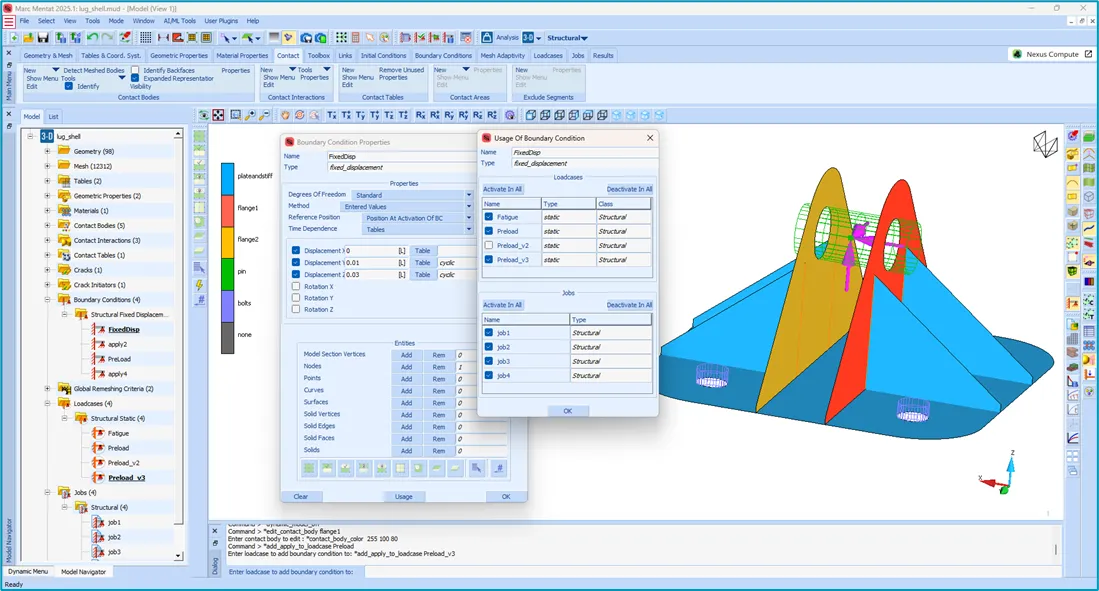
A new menu simplifies the activation and deactivation of boundary conditions across various loadcases and jobs within a model. This feature is especially useful when newly created boundary conditions need to be activated in existing loadcases, and can be done with just a few clicks. It also offers a convenient way to quickly review which boundary conditions are active in each loadcase and job and make adjustments as needed.
Close
New Usage button and Usage Of boundary condition menu for seamlessly managing boundary conditions
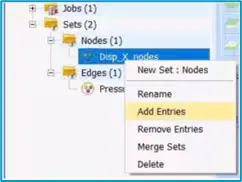
An Add Entries option has been added to the right-click menu of each set in the model tree, complementing the existing Remove Entries functionality. This enhancement streamlines the workflow and improves the overall user experience when managing the sets.
Close
Right-click menu for Sets and the new "Add entries" option
Post-processing enhancements
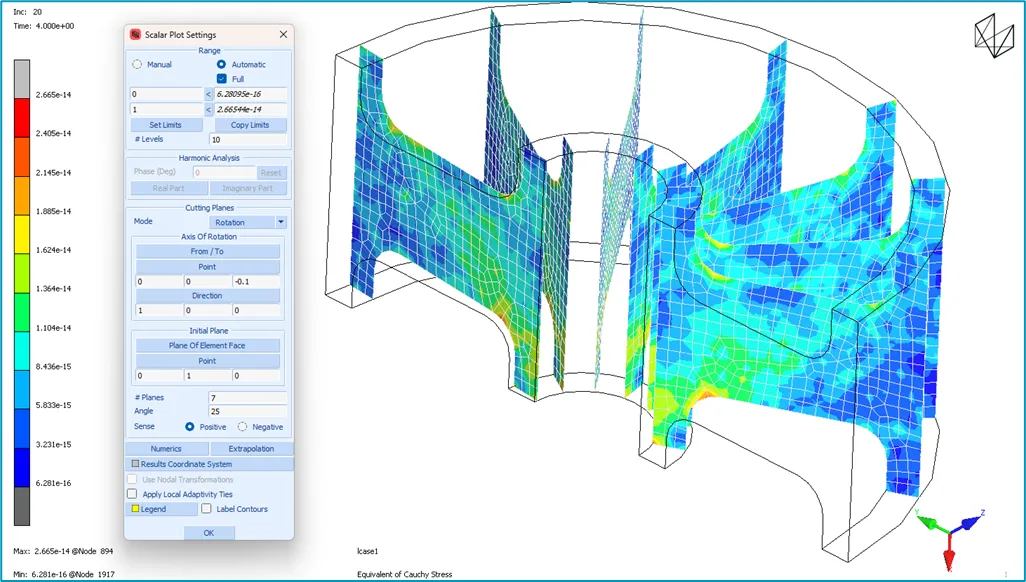
A new option has been added to the cutting planes post-processing style for scalar Descriptions, allowing users to generate multiple cutting planes by rotating the initial plane around a specified axis. Previously, cutting planes could only be created by translating the first plane using a spacing parameter. This new rotation-based method includes parameters to define the number of planes and the angle between them, and is especially valuable for post-processing analyses with models containing axisymmetric or closed-to-axisymmetric parts.
Close
Scalar Description Settings menu and cutting planes view with the new option
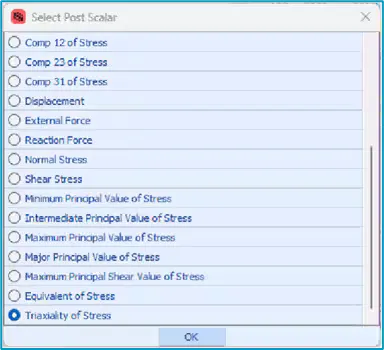
Stress triaxiality has been added to the list of available results for scalar Descriptions. Defined as the ratio of hydrostatic stress to Von Mises stress, stress triaxiality is a key parameter in fracture mechanics, often used to predict whether a material will fail in a ductile or brittle manner. No special selection is required during pre-processing; the stress triaxiality output is automatically available in post-processing whenever any stress tensor is requested.
Close
Stress triaxiality is now available for scalar Descriptions
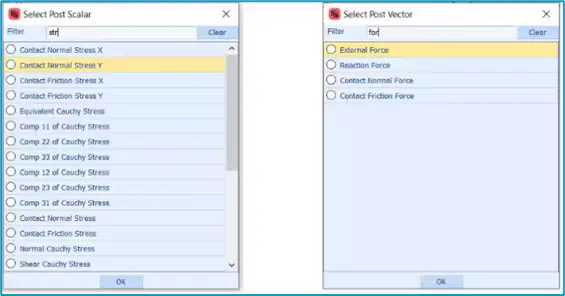
A new filter in the Select Post Scalar and Select Post Vector menus in the post-processing interface allows users to quickly locate and select the desired output quantities for Descriptionting. This is particularly helpful when working with analyses that involve similar types of results. This addition is consistent with the Job Results menu, where similar filtering options are already available.
Close
New filter tool added to Select Post Scalar and Select Post Vector menus
MSC Marcis a powerful non-linear finite-element analysis solution to accurately simulate the product behaviour under static, dynamic, and multi-physics loading scenarios. Marc is ideal for product manufacturers looking for a robust nonlinear solution. It has capabilities to elegantly simulate all kinds of nonlinearities, namely geometric, material and boundary condition nonlinearity, including contact. Marc is the only commercial solution that has robust manufacturing simulation and product testing simulation capabilities, with the ability to predict damage, failure and crack propagation. This, combined with its multi-physics capabilities can help you couple thermal, electrical, magnetic and structural analyses, Marc is the complete solution that can address all your nonlinear simulation requirements.
New features in Marc 2025.1 you'll want to use
Hexagonis a global leader in sensor, software and autonomous solutions. We are putting data to work to boost efficiency, productivity, and quality across industrial, manufacturing, infrastructure, safety, and mobility applications. Our technologies are shaping urban and production ecosystems to become increasingly connected and autonomous - ensuring a scalable, sustainable future.MSC Software, part of Hexagon's Manufacturing Intelligence division, is one of the ten original software companies and a global leader in helping product manufacturers to advance their engineering methods with simulation software and services.
Owner:Hexagon AB
Product Name:MSC Marc
Version:2025.1
Supported Architectures:x64
Website Home Page :
Languages Supported:english
System Requirements:Windows *
Size:1.7 Gb

Hybrid contact formulation updates
The recommended hybrid node-to-segment contact algorithm introduced in earlier releases is now set as the default for all new models for structural analysis (static or dynamic). This approach activates a double-sided contact formulation that primarily uses penalty-based enforcement, significantly reducing the need to manually distinguish between primary and secondary bodies. Compared to the previous node-to-segment method, users can expect improved accuracy, performance and robustness in most scenarios, along with reduced need to fine-tune contact parameters to achieve successful simulations. The hybrid approach supports now also the use of nodes on geometric contact bodies - a capability not available for other contact algorithms. This modelling flexibility is particularly beneficial for simulations involving manufacturing processes.
Close
Leaf Spring simulation using the hybrid contact algorithm
A new user material subroutine called UMATERIAL
The HYPELA2 subroutine in Marc has long provided a way to define user materials when built-in models were insufficient for capturing complex mechanical behaviour. However, its use was often cumbersome, with limited documentation and few practical examples. In the 2025.1 release, Marc introduces a new and improved subroutine for user-defined materials called UMATERIAL, designed to offer a more accessible, flexible, and user-friendly experience.
With this new capability, engineers will:
- Benefit from a clearer and more intuitive user interface compared to HYPELA2
- Gain better control over near-incompressible and incompressible materials
- Choose from predefined nonlinear integration schemes
- Implement rheological multi-network models more naturally
- Focus on defining the deviatoric behaviour while Marc automatically handles the volumetric (bulk) response
- Access a set of utility routines designed to accelerate the development of custom material models
The overall user experience for defining custom materials is significantly enhanced. To get users started quickly, two practical examples are included in the user guide: a rubber-like material model and a material model incorporating metal plasticity. These examples serve as helpful references for efficiently developing and implementing a user-defined material behaviour.
Close
UMATERIAL subroutine related menus
Previous analysis state enhancements
The pre-state functionality enables users to reuse simulation results as initial conditions for new analyses. In the Marc 2025.1 release, this capability removes previous limitations, such as when meshes differ between simulations and the HDF5 format support.
These improvements include:
- The ability to use multiple post files from various upstream analyses for defining the initial conditions for the downstream analysis, including .t16, .t19 files (both singles files and multiple files following an analysis with a domain decomposition), .h5, and .arc result files.
- Improved performance when using DDM
- The ability for the downstream simulation model to use a larger region than the model from the upstream simulation post files: portions that are outside will not be mapped
- Data mapping can be performed separately for different contact bodies
- Shell elements (including the solid shell) can be used with the general mapping option
Close
Simufact To Marc workflow example: sheet metal forming simulation results to be used as initial conditions with Marc for a springback analysis
User experience enhancements in Mentat
Based on your feedback, we have introduced features and usability improvements for both Marc and Mentat.
Lighting effect and triad
The lighting effect in Mentat improves the visual quality of 3D models for more realistic visualisation. By default, four directional light sources and one ambient (non-directional) light create a more pleasant and more clearly visualised environment. Further tailor the display by adjusting the number of light sources, their direction, colour, and the level of ambient contribution. The triad settings have been adjusted: a solid view is enabled by default for a more modern appearance
Close
Default lighting effects on a spring model using the new triad visualisation
Pre-processing enhancements
A new menu simplifies the activation and deactivation of boundary conditions across various loadcases and jobs within a model. This feature is especially useful when newly created boundary conditions need to be activated in existing loadcases, and can be done with just a few clicks. It also offers a convenient way to quickly review which boundary conditions are active in each loadcase and job and make adjustments as needed.
Close
New Usage button and Usage Of boundary condition menu for seamlessly managing boundary conditions
An Add Entries option has been added to the right-click menu of each set in the model tree, complementing the existing Remove Entries functionality. This enhancement streamlines the workflow and improves the overall user experience when managing the sets.
Close
Right-click menu for Sets and the new "Add entries" option
Post-processing enhancements
A new option has been added to the cutting planes post-processing style for scalar Descriptions, allowing users to generate multiple cutting planes by rotating the initial plane around a specified axis. Previously, cutting planes could only be created by translating the first plane using a spacing parameter. This new rotation-based method includes parameters to define the number of planes and the angle between them, and is especially valuable for post-processing analyses with models containing axisymmetric or closed-to-axisymmetric parts.
Close
Scalar Description Settings menu and cutting planes view with the new option
Stress triaxiality has been added to the list of available results for scalar Descriptions. Defined as the ratio of hydrostatic stress to Von Mises stress, stress triaxiality is a key parameter in fracture mechanics, often used to predict whether a material will fail in a ductile or brittle manner. No special selection is required during pre-processing; the stress triaxiality output is automatically available in post-processing whenever any stress tensor is requested.
Close
Stress triaxiality is now available for scalar Descriptions
A new filter in the Select Post Scalar and Select Post Vector menus in the post-processing interface allows users to quickly locate and select the desired output quantities for Descriptionting. This is particularly helpful when working with analyses that involve similar types of results. This addition is consistent with the Job Results menu, where similar filtering options are already available.
Close
New filter tool added to Select Post Scalar and Select Post Vector menus
MSC Marcis a powerful non-linear finite-element analysis solution to accurately simulate the product behaviour under static, dynamic, and multi-physics loading scenarios. Marc is ideal for product manufacturers looking for a robust nonlinear solution. It has capabilities to elegantly simulate all kinds of nonlinearities, namely geometric, material and boundary condition nonlinearity, including contact. Marc is the only commercial solution that has robust manufacturing simulation and product testing simulation capabilities, with the ability to predict damage, failure and crack propagation. This, combined with its multi-physics capabilities can help you couple thermal, electrical, magnetic and structural analyses, Marc is the complete solution that can address all your nonlinear simulation requirements.
New features in Marc 2025.1 you'll want to use
Hexagonis a global leader in sensor, software and autonomous solutions. We are putting data to work to boost efficiency, productivity, and quality across industrial, manufacturing, infrastructure, safety, and mobility applications. Our technologies are shaping urban and production ecosystems to become increasingly connected and autonomous - ensuring a scalable, sustainable future.MSC Software, part of Hexagon's Manufacturing Intelligence division, is one of the ten original software companies and a global leader in helping product manufacturers to advance their engineering methods with simulation software and services.
Owner:Hexagon AB
Product Name:MSC Marc
Version:2025.1
Supported Architectures:x64
Website Home Page :
Code:
https://hexagon.com/System Requirements:Windows *
Size:1.7 Gb
Recommend Download Link Hight Speed | Please Say Thanks Keep Topic Live
Rapidgator
HexagonMSCMarc20251.html
DDownload
ss9yy.Hexagon-MSC-Marc-2025-1.rar
FreeDL
ss9yy.Hexagon-MSC-Marc-2025-1.rar.html
Links are Interchangeable - No Password - Single Extraction

