
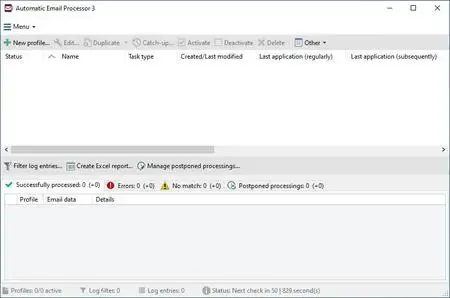
Automatic Email Processor 4.1.1 | 41.3 Mb
Automatic Email Processor is an Outlook automation utility designed to streamline the handling of incoming email messages and attachments. It enables users to automatically save, print, archive, and organize emails based on customizable rules, making it well suited for businesses and individuals who process large volumes of correspondence.
The software monitors selected Outlook folders and applies user-defined actions whenever incoming messages match specified conditions. Rules can be tailored for different email accounts and filtered by criteria such as sender, recipient, subject, attachment name, or message date, allowing routine email management tasks to run without manual intervention.
Automatic Email Processor also provides flexible archiving options by saving emails in formats such as PDF, MSG, HTML, or RTF. Storage locations can be generated dynamically using email properties, making it easy to organize messages into structured folder hierarchies for long-term storage, compliance, or document management.
Beyond archiving, the application supports advanced workflow automation. It can launch external programs, move processed emails to other Outlook folders, generate periodic reports, forward messages, and perform additional actions after processing, helping integrate Outlook with existing business processes.
Key Features:
Operating System:
Windows 11, 10, 8, 7 or Server (32-bit or 64-bit version)
Home Page
Beyond archiving, the application supports advanced workflow automation. It can launch external programs, move processed emails to other Outlook folders, generate periodic reports, forward messages, and perform additional actions after processing, helping integrate Outlook with existing business processes.
Key Features:
- Monitor multiple Outlook folders and process incoming emails automatically
- Save emails in PDF, MSG, HTML, RTF, and other supported formats
- Automatically save email attachments using customizable filtering rules
- Print emails and attachments with configurable printer settings
- Extract or print files stored inside ZIP archives
- Create unlimited processing rules for different accounts and workflows
- Filter messages by sender, recipient, subject, attachment name, and other properties
- Generate dynamic folder structures and filenames based on email metadata
- Launch external applications or scripts after processing
- Move processed emails to other Outlook folders automatically
- Archive existing Outlook folders and reprocess previously received emails
- Detach saved attachments to reduce Outlook PST file size
- Generate scheduled Excel reports with processing summaries
- Limit automatic processing to specific days and time periods
- Support command-line execution for automated tasks and scheduled operations
Operating System:
Windows 11, 10, 8, 7 or Server (32-bit or 64-bit version)
Home Page
Code:
https://gillmeister-software.com/Recommend Download Link Hight Speed | Please Say Thanks Keep Topic Live
Rapidgator
7mu4z.Automatic.Email.Processor.4.1.1.rar.html
FreeDL
7mu4z.Automatic.Email.Processor.4.1.1.rar.html
Links are Interchangeable - No Password - Single Extraction

