
Classroom Spy Pro 5.6.6 | 51.8 Mb
Classroom Spy Pro is a classroom monitoring and management application designed to help teachers, trainers, and IT administrators supervise computer-based learning environments more efficiently. The software provides real-time visibility into student activities, allowing instructors to monitor multiple computers from a single workstation without interrupting lessons.
The application enables educators to share screens, demonstrate tasks, assist students remotely, and maintain classroom discipline through a wide range of management tools. Whether used in schools, training centers, computer labs, or corporate learning environments, Classroom Spy Pro helps improve engagement and productivity while reducing distractions.
In addition to live monitoring, the software includes remote control capabilities, activity logging, screen recording, internet and application restrictions, and system administration functions. Its flexible deployment options support local networks, wireless environments, VPN connections, and remote desktop sessions.
Main Features:
- Real-time monitoring of student computer screens
- Remote mouse and keyboard control
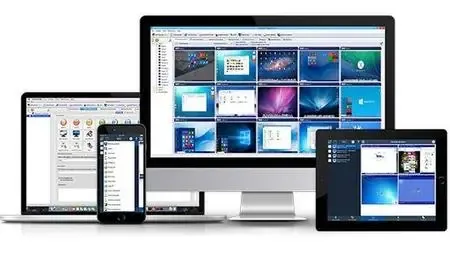
- Display multiple screens in a thumbnail grid
- Organize computers into custom groups or classrooms
- Zoom remote screens for detailed viewing
- View connected user information
- Record remote desktop activity to MPG4 files
- Share teacher or student screens with the entire class
- Remote shutdown, restart, suspend, and hibernate functions
- Log off users remotely
- Lock workstations instantly
- Clear student desktops
- Manage screen saver settings
- Block internet access
- Restrict selected applications
- Mute remote computers
- Control audio volume levels remotely
- Disable printing capabilities
- Disable Ctrl+Alt+Del shortcuts
- Blank student screens when needed
- Launch programs remotely and view results
- Open websites on selected computers
- Multi-monitor environment support
- Manage running processes and applications
- Lock selected computers individually
- Send messages to remote users
- Adjust refresh intervals for low-bandwidth networks
- Automatic connection options
- Encrypted and password-protected agent settings
- Password-protected remote access
- Multiple monitoring consoles per computer
- Remote agent deployment
- Fast User Switching support
- Support for RDP, Terminal Services, and Citrix sessions
- Access from smartphones and tablets
- Simplifies classroom supervision and management
- Provides instant visibility of student activity
- Supports interactive teaching and demonstrations
- Allows remote assistance without leaving your desk
- Helps reduce distractions and unauthorized usage
- Enables centralized control of classroom computers
- Records user activity for review and auditing
- Supports application and web access restrictions
- Offers comprehensive logging and monitoring tools
- Suitable for schools, labs, and training centers
- Live classroom monitoring of student desktops
- Screen sharing between teacher and students
- Remote mouse and keyboard control
- Quick classroom lock function
- Remote screen recording support
- Remote administration tools
- Internet browsing restrictions
- Application and process management
- Terminal Services and thin client monitoring
- Remote installation and configuration
- Support for LAN, WLAN, VPN, and Internet connections
- Enhanced password protection
- Multi-monitor compatibility
* Windows XP, Windows 2003 Windows Vista
* Windows 7
* Windows 8 / 8.1
* Windows 10
* Windows 11
Home Page -
Code:
http://classroomspy.comRecommend Download Link Hight Speed | Please Say Thanks Keep Topic Live
Rapidgator
wr86h.Classroom.Spy.Pro.5.6.6.rar.html
DDownload
wr86h.Classroom.Spy.Pro.5.6.6.rar
FreeDL
wr86h.Classroom.Spy.Pro.5.6.6.rar.html
Links are Interchangeable - No Password - Single Extraction

