
Free Download DA-HelpCreator 2.8.5 | 26 Mb
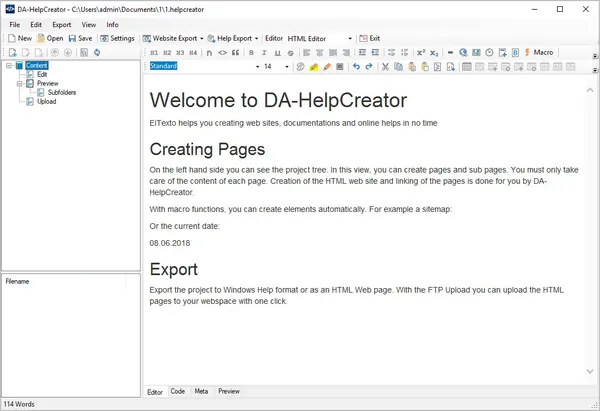
DA-HelpCreator is a help authoring application designed for creating professional documentation, online help systems, and knowledge base content from a single project. It enables software developers, technical writers, and support teams to organize documentation efficiently while keeping content separate from presentation.
Using a lightweight Markdown-based workflow, DA-HelpCreator simplifies the writing process and allows users to focus on producing accurate documentation instead of formatting. Projects can be published in multiple formats, making the same content suitable for desktop help files, websites, or offline documentation.
The software also provides customizable templates, automatic navigation generation, and integrated publishing tools, helping maintain consistent documentation across different distribution channels.
Projects are stored using an open file structure with text-based content, making version control and external editing straightforward when working with tools such as Git, Subversion, or text editors.
Key Features
- Create documentation in HTML, CHM, and executable help formats.
- Write documentation using simple Markdown syntax.
- Automatically generate navigation elements and tables of contents with macro functions.
- Choose from responsive HTML templates that can be customized.
- Publish documentation directly to a web server using the integrated FTP upload and synchronization feature.
- Generate static website output for improved security.
- Store projects in an open file structure for easier management with external tools.
The combination of flexible export options, customizable templates, and open project storage makes it practical for maintaining both online and offline documentation over time.
System RequirementsOperating System: Windows 7, 8/8.1, 10
Frequently Asked Questions
What is DA-HelpCreator used for?It is used to create software documentation, online help systems, FAQ pages, and technical manuals from a single project.
Which output formats are supported?The software can export documentation as HTML websites, Microsoft CHM help files, and executable help packages.
How is documentation written?Content is created using Markdown syntax, allowing authors to focus on writing instead of formatting.
Can projects be published directly online?Yes. The integrated FTP upload and synchronization feature allows exported websites to be uploaded directly to web hosting.
Home Page
Code:
https://da-software.de/en/software/da-helpcreator/- Software Name: DA-HelpCreator
- Version: 2.8.5
- Languages: English
- License type: Full Version
- File Size: 26 Mb
Recommend Download Link Hight Speed | Please Say Thanks Keep Topic Live
Rapidgator
eb0t5.DAHelpCreator.2.8.5.rar.html
UploadCloud
eb0t5.DAHelpCreator.2.8.5.rar.html
DDownload
eb0t5.DAHelpCreator.2.8.5.rar
FreeDL
eb0t5.DAHelpCreator.2.8.5.rar.html
Links are Interchangeable - No Password - Single Extraction

