
Disk Savvy 18.2.36 | 40.5 Mb
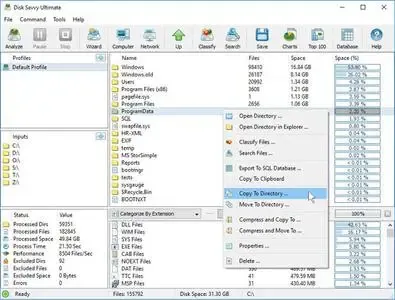
Disk Savvy is a disk space analysis and file classification utility that helps users understand how storage resources are being utilized across local drives, network shares, NAS devices, and enterprise storage environments. The software provides detailed insights into disk usage, enabling administrators and power users to identify large files, optimize storage allocation, and manage data more efficiently.
The application features a comprehensive graphical interface capable of analyzing one or multiple storage locations simultaneously. Results can be categorized, filtered, and organized using a variety of criteria, allowing users to quickly locate files based on type, size, extension, owner, and other attributes. Detailed reports can be generated and exported in several popular formats for documentation and auditing purposes.
Disk Savvy also includes advanced file classification capabilities that help determine which categories of files consume the most storage space. Interactive charts and visual reports make it easier to evaluate storage trends and present findings in reports, presentations, or internal documentation.
For enterprise environments, the software can scan networks, discover available servers and NAS devices, detect accessible network shares, and perform storage analysis across multiple systems from a centralized interface.
Key Features:
- Analyze local disks and storage devices
- Monitor network shares and NAS systems
- Advanced disk space usage analysis
- File classification and categorization tools
- Filter results by type, size, extension, and user
- Generate detailed storage reports
- Export reports to HTML, PDF, Excel, XML, TXT, and CSV
- Interactive disk usage pie charts
- Visualize storage consumption patterns
- Copy charts directly to the clipboard
- Perform file management operations
- Analyze multiple disks simultaneously
- Support for file classification plug-ins
- Discover network servers automatically
- Detect accessible network shares
- Analyze storage across enterprise environments
Supported Operating Systems:
Windows XP, Vista, 7, 8, 8.1, 10
Server 2003, 2008, 2008 R2, 2012, 2012 R2, 2016
Home Page
Code:
https://www.disksavvy.com/Recommend Download Link Hight Speed | Please Say Thanks Keep Topic Live
Rapidgator
n037z.Disk.Savvy.18.2.36.rar.html
DDownload
n037z.Disk.Savvy.18.2.36.rar
FreeDL
n037z.Disk.Savvy.18.2.36.rar.html
Links are Interchangeable - No Password - Single Extraction

