
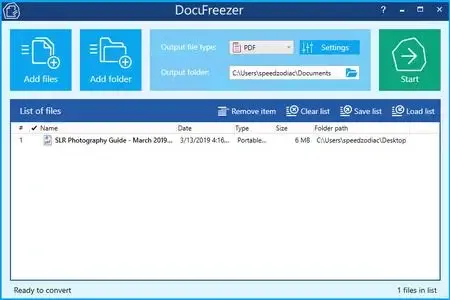
DocuFreezer 7.0.2606.20080 Multilingual Fast Links | 214 MB
DocuFreezer is a professional batch document and image conversion solution for Windows that enables users to convert large numbers of files into PDF, TXT, JPG, TIFF, or PNG formats while preserving the original appearance and formatting. The software is designed to "freeze" documents, ensuring they remain visually identical across devices and protected from unwanted modifications.
Supporting more than 80 document and image formats, DocuFreezer is ideal for document archiving, file distribution, batch conversion workflows, and long-term preservation of digital content.
Key Features:
- Batch convert documents and images to PDF, JPG, TIFF, PNG, and TXT
- Preserve original formatting, fonts, layouts, and hyperlinks
- Process hundreds of files in a single operation
- Simple drag-and-drop interface
- Convert files directly from folders and archives
- Supports ZIP, RAR, and 7Z archives
- Maintain original filenames, metadata, and folder structures
- Preserve attachments and color attributes when supported
- Merge multiple files into a single PDF or TIFF document
- Split large PDF and TIFF files into separate pages
- Append pages to existing PDF documents
- Extract pages from multipage documents
- Add text or image watermarks
- Configure page rotation and auto-rotation
- Set DPI, image quality, and color space options
- Save and load conversion task lists
- Perform OCR on scanned documents and images
- Create searchable PDF files from scanned content
- Configure post-processing actions for automated workflows
DocuFreezer supports more than 80 file formats, including:
- Microsoft Word (DOC, DOCX)
- Microsoft Excel (XLS, XLSX)
- Microsoft PowerPoint (PPT, PPTX, PPSX)
- HTML and web documents
- TXT and RTF files
- XPS and OXPS documents
- AutoCAD DWG and DXF files
- Publisher PUB files
- OpenDocument formats (ODT, ODF)
- JPEG, PNG, TIFF, and other image formats
- Outlook email files
- PDF to JPG, TIFF, or TXT
- Word DOC/DOCX to PDF, JPG, or TIFF
- HTML to PDF, JPG, or PNG
- JPEG to TIFF and TIFF to JPEG
- Publisher files to JPG
- PowerPoint presentations to PDF
- TXT documents to image formats
- CAD drawings to multipage PDF documents
- Merge and combine PDF or TIFF files
- Convert email messages with attachments
- Create multipage PDF and TIFF documents
- Customize output filenames automatically
- Batch process large document collections
- Archive files in non-editable formats
- Generate searchable documents using OCR
- Windows XP SP3, 7, 8, 10, 11 (32-bit and 64-bit)
- Windows Server 2003/2008/2012/2016/2019 or newer
- Intel Core i3, AMD Athlon II X2, or faster processor
- 8 GB RAM or higher
- 412 MB available disk space
- Microsoft .NET Framework 4.0
Code:
https://www.docufreezer.com/Recommend Download Link Hight Speed | Please Say Thanks Keep Topic Live
Rapidgator
xk7w3.DocuFreezer.7.0.2606.20080.rar.html
DDownload
xk7w3.DocuFreezer.7.0.2606.20080.rar
FreeDL
xk7w3.DocuFreezer.7.0.2606.20080.rar.html
Links are Interchangeable - No Password - Single Extraction

