
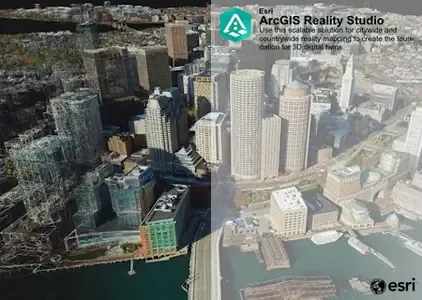
ESRI ArcGIS Reality Studio 2026.1 | 2.5 Gb
Esri, the global leader in spatial analytics technology, has released ArcGIS Reality Studio 2026.1.0 is a photogrammetry product that is optimized for precision, speed, and simplicity.
Reality Studio 2026.1 introduces new cloud processing capabilities, improves the quality and speed of results, enhances support for editing workflows, and delivers a more productive experience with an upgraded and more stable user interface.
Scalability on the cloud
Expanded support for cloud processing enables you to scale production on demand, cover hardware infrastructure needs, and collaborate seamlessly and securely across distributed teams. Save all input data in object storage locations and import it into your project. Scale production with cloud infrastructure by creating a workspace in an object storage location and deploying virtual machines to contribute to it. Leveraging cloud resources requires you to configure access to the input data and workspace through .acs cloud storage connection files.
Process on Linux instances
The ArcGIS Reality Studio Node command‑line interface is now available for Linux operating systems. Use Linux instances to process projects with input data stored in the cloud. Create your projects in the Windows graphical user interface and connect the Linux instances to the corresponding workspace. ArcGIS Reality Studio supports mixed processing clusters, allowing you to process jobs simultaneously across both Linux and Windows nodes, providing strong versatility and flexibility for diverse deployment environments.
Improved Gaussian splats quality
The fidelity of Gaussian splats results has been improved, especially the visualization of thin structures, high frequency texture, and dimensional accuracy. You can now interact with Gaussian splats more efficiently in 3D scenes, even in the case of very large datasets, spanning entire cities.
Faster results
Produce your geospatial products faster by leveraging a new quality level, reutilizing your alignment results and parallelizing your finalization step.
Reconstruction quality levels
A new rapid quality level option for reconstructions generates results in a fraction of the usual time, giving you a fast preview of your geospatial outputs. This setting is enabled when capture sessions used as input have been previously aligned in ArcGIS Reality Studio. The workflow produces true ortho-mosaics and digital surface models, enabling quick data validation, situation assessment for rapid response, and efficient preparation for full‑quality production workflows.
Reconstruction processing improvements
Produce your final results faster with these two improvements:
- Reconstructions with aligned capture sessions as input have a much faster reconstruction analysis stage, shortening the time until the entire processing cluster can contribute to the processing.
- The reconstruction finalization stage is parallelized when multiple products are requested, shortening the time until you can interact with individual product results and reducing the processing time.
Enhanced quality assurance workflows
Importing external data and enhancing the import option for water body geometries boost the quality assurance workflows.
Import external data
You can now import raster data, meshes, and Gaussian splats into ArcGIS Reality Studio. Leverage this data to support your reality mapping workflows with a better geometric and textured context.
Applications include the following:
- External data can be used for visual context or elevation data to guide the creation of water body geometries for the next project.
- Once results are available, multiple users can inspect them and create water, correction, or quality control geometries simultaneously. Import and merge these geometries into the original project to improve your results.
Separate coarse and precise water body geometries
You can now use both coarse and precise water body geometry types in parallel within the same reconstruction processing iteration. To minimize digitization efforts, you can initially specify a coarse water body and subsequently, if needed, add precise geometries to fix remaining artifacts.
User interface improvements
Enhancements on the image measurement tool, the project tree structure and the pane design enable faster and more intuitive user interaction.
Image measurement tool
The image measurement tool now offers more efficient and intuitive functionality. In addition to the existing table-based approach, you can now interact with control points and manage them directly on the map by doing the following:
- Select a point in the map to start the image measurement process.
- Change the role of the selected point or create a new manual tie point through the new contextual menu.
- Filter visualization of control points by role and image measurement status, or show/hide point labels.
Other improvements
The redesigned project tree makes it easier to navigate complex datasets. Everything is unified into a single view, bringing data and visualization controls into one place for faster interaction. Visual guidelines improve readability in large projects, while you can conveniently toggle the visibility of entire groups from their contextual menu. Capture session, alignment, and reconstruction panes are also streamlined with a more intuitive layout, focusing on core settings while keeping advanced options easily accessible.
New offline and online help experience
Reality Studio help content is now aligned with and integrates into the broader ArcGIS documentation system, enabling a more consistent experience across products. Both offline and online help provide the same structure, navigation, and content organization.
ArcGIS Reality Studio is an advanced photogrammetry product optimized for precision, speed, and simplicity. This scalable solution for city and countrywide reality mapping is an important component of 3D digital twins. Align large collections of images captured by drones and aerial sensors across multiple flights to create highly accurate true orthos, 3D meshes, point clouds, and Gaussian splats. An intuitive map-centric user interface provides seamless workflows for the efficient creation, editing, and quality control of survey-grade products. Easily collaborate and share data within geographic information system (GIS) technology and mapping systems for photorealistic visualization and analysis.
ArcGIS Reality Studio | Creating a 3D City
In this video Esri experts reveal how they used ArcGIS Reality Studio to create incredibly accurate 3D representations of Harvard University and the entire city of Cambridge MA. See how 19 terabytes of high-resolution imagery was processed in ArcGIS Reality Studio in mere days (compared to traditional methods that often require MONTHS).
Esri, the global market leader in geographic information system (GIS) software, location intelligence, and mapping, helps customers unlock the full potential of data to improve operational and business results. Founded in 1969 in Redlands, California, USA, Esri software is deployed in hundreds of thousands of organizations globally, including Fortune 500 companies, government agencies, nonprofit institutions, and universities. Esri has regional offices, international distributors, and partners providing local support in over 100 countries on six continents. With its pioneering commitment to geospatial technology and analytics, Esri engineers the most innovative solutions that leverage a geographic approach to solving some of the world's most complex problems by placing them in the crucial context of location.
Сopyright holder \ Distributor:Esri
Product Name:ArcGIS Reality Studio
Version:2026.1.0 (1904)
Supported Architectures:x64
Website Home Page :www.esri.com
Languages Supported:english
System Requirements:Windows *
Size in archive:2.5 Gb
Expanded support for cloud processing enables you to scale production on demand, cover hardware infrastructure needs, and collaborate seamlessly and securely across distributed teams. Save all input data in object storage locations and import it into your project. Scale production with cloud infrastructure by creating a workspace in an object storage location and deploying virtual machines to contribute to it. Leveraging cloud resources requires you to configure access to the input data and workspace through .acs cloud storage connection files.
Process on Linux instances
The ArcGIS Reality Studio Node command‑line interface is now available for Linux operating systems. Use Linux instances to process projects with input data stored in the cloud. Create your projects in the Windows graphical user interface and connect the Linux instances to the corresponding workspace. ArcGIS Reality Studio supports mixed processing clusters, allowing you to process jobs simultaneously across both Linux and Windows nodes, providing strong versatility and flexibility for diverse deployment environments.
Improved Gaussian splats quality
The fidelity of Gaussian splats results has been improved, especially the visualization of thin structures, high frequency texture, and dimensional accuracy. You can now interact with Gaussian splats more efficiently in 3D scenes, even in the case of very large datasets, spanning entire cities.
Faster results
Produce your geospatial products faster by leveraging a new quality level, reutilizing your alignment results and parallelizing your finalization step.
Reconstruction quality levels
A new rapid quality level option for reconstructions generates results in a fraction of the usual time, giving you a fast preview of your geospatial outputs. This setting is enabled when capture sessions used as input have been previously aligned in ArcGIS Reality Studio. The workflow produces true ortho-mosaics and digital surface models, enabling quick data validation, situation assessment for rapid response, and efficient preparation for full‑quality production workflows.
Reconstruction processing improvements
Produce your final results faster with these two improvements:
- Reconstructions with aligned capture sessions as input have a much faster reconstruction analysis stage, shortening the time until the entire processing cluster can contribute to the processing.
- The reconstruction finalization stage is parallelized when multiple products are requested, shortening the time until you can interact with individual product results and reducing the processing time.
Enhanced quality assurance workflows
Importing external data and enhancing the import option for water body geometries boost the quality assurance workflows.
Import external data
You can now import raster data, meshes, and Gaussian splats into ArcGIS Reality Studio. Leverage this data to support your reality mapping workflows with a better geometric and textured context.
Applications include the following:
- External data can be used for visual context or elevation data to guide the creation of water body geometries for the next project.
- Once results are available, multiple users can inspect them and create water, correction, or quality control geometries simultaneously. Import and merge these geometries into the original project to improve your results.
Separate coarse and precise water body geometries
You can now use both coarse and precise water body geometry types in parallel within the same reconstruction processing iteration. To minimize digitization efforts, you can initially specify a coarse water body and subsequently, if needed, add precise geometries to fix remaining artifacts.
User interface improvements
Enhancements on the image measurement tool, the project tree structure and the pane design enable faster and more intuitive user interaction.
Image measurement tool
The image measurement tool now offers more efficient and intuitive functionality. In addition to the existing table-based approach, you can now interact with control points and manage them directly on the map by doing the following:
- Select a point in the map to start the image measurement process.
- Change the role of the selected point or create a new manual tie point through the new contextual menu.
- Filter visualization of control points by role and image measurement status, or show/hide point labels.
Other improvements
The redesigned project tree makes it easier to navigate complex datasets. Everything is unified into a single view, bringing data and visualization controls into one place for faster interaction. Visual guidelines improve readability in large projects, while you can conveniently toggle the visibility of entire groups from their contextual menu. Capture session, alignment, and reconstruction panes are also streamlined with a more intuitive layout, focusing on core settings while keeping advanced options easily accessible.
New offline and online help experience
Reality Studio help content is now aligned with and integrates into the broader ArcGIS documentation system, enabling a more consistent experience across products. Both offline and online help provide the same structure, navigation, and content organization.
ArcGIS Reality Studio is an advanced photogrammetry product optimized for precision, speed, and simplicity. This scalable solution for city and countrywide reality mapping is an important component of 3D digital twins. Align large collections of images captured by drones and aerial sensors across multiple flights to create highly accurate true orthos, 3D meshes, point clouds, and Gaussian splats. An intuitive map-centric user interface provides seamless workflows for the efficient creation, editing, and quality control of survey-grade products. Easily collaborate and share data within geographic information system (GIS) technology and mapping systems for photorealistic visualization and analysis.
ArcGIS Reality Studio | Creating a 3D City
In this video Esri experts reveal how they used ArcGIS Reality Studio to create incredibly accurate 3D representations of Harvard University and the entire city of Cambridge MA. See how 19 terabytes of high-resolution imagery was processed in ArcGIS Reality Studio in mere days (compared to traditional methods that often require MONTHS).
Esri, the global market leader in geographic information system (GIS) software, location intelligence, and mapping, helps customers unlock the full potential of data to improve operational and business results. Founded in 1969 in Redlands, California, USA, Esri software is deployed in hundreds of thousands of organizations globally, including Fortune 500 companies, government agencies, nonprofit institutions, and universities. Esri has regional offices, international distributors, and partners providing local support in over 100 countries on six continents. With its pioneering commitment to geospatial technology and analytics, Esri engineers the most innovative solutions that leverage a geographic approach to solving some of the world's most complex problems by placing them in the crucial context of location.
Сopyright holder \ Distributor:Esri
Product Name:ArcGIS Reality Studio
Version:2026.1.0 (1904)
Supported Architectures:x64
Website Home Page :www.esri.com
Languages Supported:english
System Requirements:Windows *
Size in archive:2.5 Gb
Recommend Download Link Hight Speed | Please Say Thanks Keep Topic Live
Rapidgator
ESRIArcGISRealityStudio20261.html
DDownload
t9gd9.ESRI-ArcGIS-Reality-Studio-2026-1.part1.rar
t9gd9.ESRI-ArcGIS-Reality-Studio-2026-1.part2.rar
FreeDL
t9gd9.ESRI-ArcGIS-Reality-Studio-2026-1.part1.rar.html
t9gd9.ESRI-ArcGIS-Reality-Studio-2026-1.part2.rar.html
Links are Interchangeable - No Password - Single Extraction

