
Last updated 9/2016
MP4 | Video: h264, 1280x720 | Audio: AAC, 44.1 KHz
Language: English | Size: 776.46 MB | Duration: 1h 54m
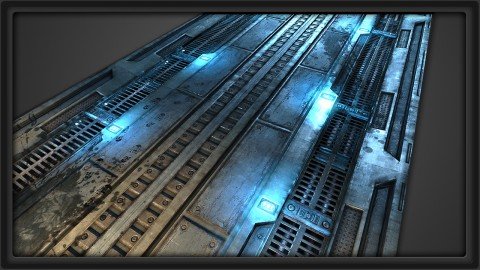
Learn normal map baking in 3ds Max and get a crash-course in materials inside UDK as we texture this sci-fi floor!
What you'll learn
Learn how to bake normal maps from a high poly model
Learn to texture the sci-fi floor from start to finish
Learn to create the material inside of UDK as you see here
Learn to light the scene and polish your materials
Requirements
3ds Max
UDK
Photoshop
Description
Starting with the normal map baking process in 3ds Max, we'll create a color and specular map using Photoshop, use selection masks created with Render to Texture, set up a material for the floor piece, and finally add some lights and decals when we put it all together inside of UDK. With lots of great tips and practical hands on techniques, this video serves as a great workflow tutorial for high quality game assets. About the Instructor: Mike Snight is the Co-Founder/Owner of 3dmotive.com. He currently works at Irrational Games as a Senior Level Artist, and contributed heavily to the production of the smash hit Bioshock: Infinite. Mike is a long-time fan of the BioShock series and a 2008 Game Art and Design graduate from The Art Institute of California-Los Angeles. Mike has also contributed to the Activision titles Transformers: War for Cybertron, and Transformers: Dark of the Moon.
Overview
Section 1: Introduction to Bake Settings and Importing to UDK
Lecture 1 Introduction
Lecture 2 Using the Grid
Lecture 3 Exploding the Low for Baking
Lecture 4 Baking the AO and Normal Maps
Lecture 5 Baking out a Selection Mask
Lecture 6 Importing the Mesh into UDK
Section 2: Working on Base Textures
Lecture 7 Starting our Base Color Map
Lecture 8 Using our Selection Mask
Lecture 9 Adding Paint Layers
Lecture 10 Adjusting Values in the Color Map
Lecture 11 Adding Grunge Layers
Lecture 12 Adding Dust and Rust Layers
Section 3: Wrapping up the Material, and Final Presentation
Lecture 13 Rust Edging and Scratch Pass
Lecture 14 Creating an Opacity Mask
Lecture 15 Creating the Specular Map
Lecture 16 Setting up the Final Material
Lecture 17 Decals, Lighting Pass, and Final Presentation
Lecture 18 Bonus Lecture: Further Learning with 3dmotive
Beginners-to-Intermediate Game Artists,Anyone interested in learning high quality texturing techniques
Homepage
Code:
https://www.udemy.com/course/3dmotive-game-asset-modeling-the-sci-fi-modular-floor-workflow/Recommend Download Link Hight Speed | Please Say Thanks Keep Topic Live
Code:
Rapidgator
https://rapidgator.net/file/3bdf08c33c3f5df98ee780ca83d8dfdd/vhyyj.Game.Asset.Modeling..The.SciFi.Modular.Floor.Workflow.rar.html
Uploadgig
https://uploadgig.com/file/download/40d4fd7A92a2C183/vhyyj.Game.Asset.Modeling..The.SciFi.Modular.Floor.Workflow.rar
NitroFlare
https://nitroflare.com/view/1B53385CAC072BD/vhyyj.Game.Asset.Modeling..The.SciFi.Modular.Floor.Workflow.rar
