
Macro Commander Pro+ 2.8.7 Multilingual Fast Links | 24.4 Mb
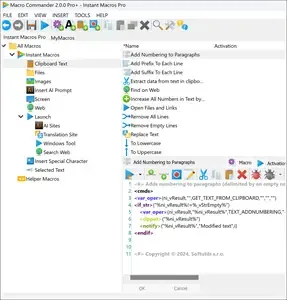
Macro Commander Pro+ is a desktop automation and data entry application that helps eliminate repetitive tasks by creating customizable macros and scripts. It provides an efficient way to automate routine workflows, improve productivity, and reduce manual errors through an intuitive interface and a built-in macro recorder.
The software combines advanced text expansion with a comprehensive automation engine featuring more than 300 built-in commands. Users can automate file management, clipboard operations, text processing, image editing, Office applications, web browsers, and Windows desktop programs without requiring complex scripting knowledge. For advanced scenarios, Macro Commander also supports integration with PowerShell to extend automation capabilities.
Designed for both personal and business use, Macro Commander Pro+ offers flexible macro activation methods, including hotkeys, text shortcuts, mouse gestures, toolbars, scheduled tasks, and event-based triggers, making it suitable for unattended automation as well as daily productivity tasks.
Key Features:
- Automate repetitive desktop tasks with customizable macros.
- Built-in macro recorder for keyboard and mouse actions.
- Over 300 commands for desktop and workflow automation.
- Create Text, General, and Clipboard macros.
- Insert rich text, formatted content, images, and links.
- Support dynamic variables and personalized data entry.
- Import data from Excel, Word, CSV files, web pages, and remote sources.
- Automate file copying, moving, renaming, deleting, compression, and encryption.
- Resize, crop, rotate, convert, watermark, and edit images.
- Automate Microsoft Word and Excel operations.
- Control desktop applications with simulated mouse and keyboard actions.
- Automate browser interactions including navigation, form filling, and clicking elements.
- Extract data from spreadsheets, documents, web pages, text files, and OCR results.
- Support wildcard and regular expression searches.
- Dual editing modes with visual steps and syntax-highlighted code editor.
- Autocomplete, drag-and-drop editing, and code formatting tools.
- Launch macros using hotkeys, text shortcuts, mouse gestures, or custom toolbars.
- Run macros automatically through schedules, file monitoring, and event triggers.
- Scope macro execution to specific applications or windows.
- Extend automation with PowerShell integration.
Code:
https://www.macro-commander.com/Recommend Download Link Hight Speed | Please Say Thanks Keep Topic Live
KatFile
m5hwt.Macro.Commander.Pro.2.8.7.Multilingual.rar.html
Rapidgator
m5hwt.Macro.Commander.Pro.2.8.7.Multilingual.rar.html
FreeDL
m5hwt.Macro.Commander.Pro.2.8.7.Multilingual.rar.html
Links are Interchangeable - No Password - Single Extraction

