
SmartGit 26.1.045 Multilingual Fast Links | 133.6 Mb
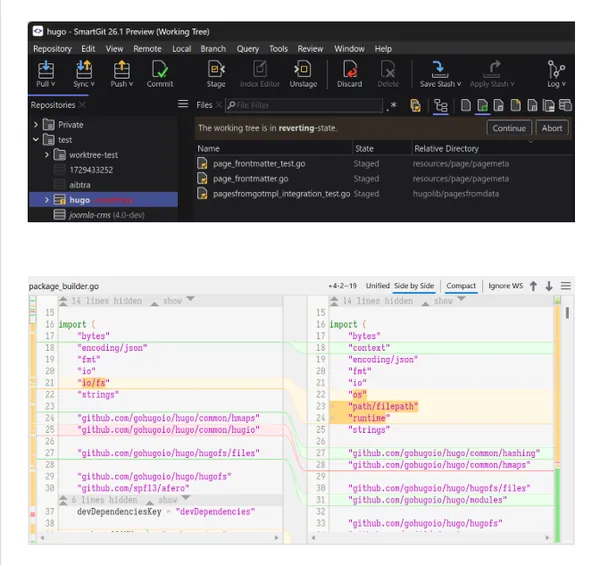
SmartGit is a graphical Git client designed to simplify version control and repository management across Windows, macOS, and Linux. It provides an intuitive interface for working with Git repositories while supporting both new users and experienced developers through a wide range of integrated development tools.
The application enables developers to manage commits, branches, merges, rebases, and repository history from a centralized interface. It also integrates with popular Git hosting platforms, allowing teams to collaborate on pull requests, review comments, and source code management without relying entirely on command-line tools.
SmartGit includes the essential components required for everyday Git workflows, including built-in comparison and merge tools, Git Flow support, an integrated Git client, and SSH functionality. Extensive customization options allow users to adapt the interface and workflow to individual development preferences.
Key Features:
- Provides a graphical interface for Git repository management.
- Supports Windows, macOS, and Linux with a consistent user experience.
- Displays graphical commit history and branch relationships.
- Supports drag-and-drop commit reordering, merging, and rebasing.
- Optimized to work efficiently with large repositories.
- Integrates with GitHub, GitLab, Bitbucket, Bitbucket Server, and Azure DevOps.
- Allows creating and managing pull requests and review comments through supported platforms.
- Includes an integrated Git client and SSH client.
- Provides built-in file comparison and conflict resolution tools.
- Supports Git Flow for branch and release management.
- Allows customization of merge and rebase preferences.
- Supports external development and comparison tools.
- Offers configurable syntax highlighting, keyboard shortcuts, toolbars, and interface layouts.
- Includes both light and dark interface themes.
Why Choose SmartGit:
SmartGit provides a comprehensive graphical environment for managing Git repositories, making version control more accessible while preserving advanced functionality for professional development teams. It is suitable for software developers, DevOps engineers, and organizations that require an efficient interface for everyday Git operations.
Its integrated repository management tools, platform integrations, customizable workflow options, and built-in comparison and merge utilities allow developers to perform common version control tasks without switching between multiple applications.
System Requirements:
Windows, macOS, or Linux
Home Page
Code:
https://www.syntevo.com/smartgit/Recommend Download Link Hight Speed | Please Say Thanks Keep Topic Live
Rapidgator
n6b1s.SmartGit.26.1.045.Multilingual.rar.html
UploadCloud
n6b1s.SmartGit.26.1.045.Multilingual.rar.html
FreeDL
n6b1s.SmartGit.26.1.045.Multilingual.rar.html
Links are Interchangeable - No Password - Single Extraction

