
ThunderSoft Video Editor Pro 13.4 (x64) Multilingual Fast Links | 327.4 Mb
ThunderSoft Video Editor Pro is a comprehensive video editing application designed for content creators, vloggers, educators, and social media producers who need an intuitive yet feature-rich editing environment. Combining a powerful timeline editor with an extensive collection of visual effects and media tools, the software simplifies the process of creating professional-looking videos for any purpose.
The program provides a complete editing workspace where users can import videos, photos, music, and other media assets, then arrange them on multiple tracks for precise editing. With support for text, audio, effects, and picture-in-picture layers, complex video projects can be built using an easy drag-and-drop workflow.
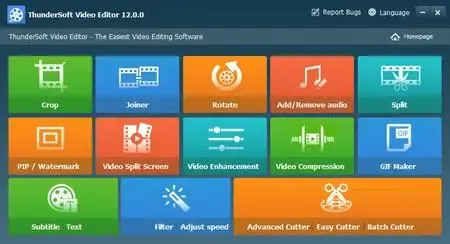
Hundreds of built-in transitions, filters, overlays, animations, and text effects help enhance videos without requiring advanced editing experience. The integrated toolkit also includes numerous utilities for cutting, merging, cropping, compressing, watermarking, subtitle editing, GIF creation, and playback speed adjustment.
Whether producing online content, presentations, tutorials, or personal videos, ThunderSoft Video Editor Pro delivers a complete set of tools for editing, enhancing, and exporting high-quality video projects, including support for 4K output formats.
Key Features:
- Easy-to-use video editing workspace
- Organized media and project management
- Advanced timeline-based editing
- Split and trim video clips precisely
- Drag-and-drop editing workflow
- Multiple video, audio, text, and effect tracks
- Picture-in-picture video support
- Undo and redo editing actions
- Fast project saving and loading
- Real-time project preview
- Add and customize text overlays
- Create and edit subtitles
- Hundreds of transitions and visual effects
- Built-in filters, overlays, and animations
- Adjust effect parameters individually
- Export to MP4, AVI, WMV, MKV, MOV, and GIF
- Export audio in MP3 and AAC formats
- 4K video output support
- Rotate, crop, split, cut, and join videos
- Add or replace audio tracks
- Remove original audio from videos
- Delete unwanted video segments
- Adjust brightness, contrast, and saturation
- Apply extensive video filters
- Add image, video, GIF, and text watermarks
- Create picture-in-picture compositions
- Import SRT and ASS subtitle files
- Compress videos while maintaining quality
- Generate GIFs from videos and images
- Create split-screen video layouts
- Control video playback speed
- Speed up or slow down footage
Operating System: Windows 11/10/8.1/8/7/Vista/XP
Home Page
Code:
https://www.thundershare.net/Recommend Download Link Hight Speed | Please Say Thanks Keep Topic Live
Rapidgator
hsb25.ThunderSoft.Video.Editor.Pro.13.4.x64.Multilingual.rar.html
FreeDL
hsb25.ThunderSoft.Video.Editor.Pro.13.4.x64.Multilingual.rar.html
Links are Interchangeable - No Password - Single Extraction

