
TidyTag Music Tag Editor 2.0 | 28.6 Mb
A powerful and versatile music tagger that is designed to add or modify ID3 tags to music collections and remove duplicates in music libraries.
Troubled by missing and mislabeled music info about songs in your music library? Tidytag helps you with every aspect of managing the music collection. Whether you are a musician, DJ, or a music enthusiast.
Tidytag Support All Popular Formats
- Audio formats MP3, AIFF, AIF, M4A, M4R, FLAC, OGG, WAV, APE, ASF and WMA
- Metadata formats ID3V1.3, ID3V2.3, ID3V2.4, Ogg Vorbis Comment, APE, ASF, RIFF Tag
Powerful Music Metadata Editor
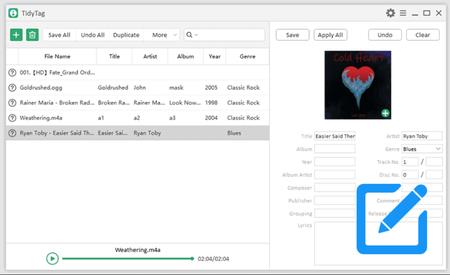
When you import the audio file, TidyTag will automatically display the corresponding metadata tag. You can easily
- Edit metadata tags like song title, album, artist, release year, genre, track number, cover, lyrics, and more that are originally wrong or missing.
- Batch process all missing or incorrect tags at one time.
- Edit tags with various options, including Undo, Save, Apply, Clear and much more.
Organize Your Music Collection
To have full control of your music library and audio files, you need to have accurately formatted names and a neat folder hierarchy. TidyTag allows you to
- Rename the audio files according to the tag information.
- Manage files by moving them to seperate folders according to their Album, Artist, Album Artist and Genre.
Remove Duplicates in Music Library
Getting tired of duplicated audio files which occupy much hard drive space, but it's time-saving for us to remove duplicates mannually. Tidytag helps to
- Automatically filter out duplicate songs with the same path when adding new songs to your library, keeping only one.
- Scan the duplicates using different audio file attributes like title, artist, file size or release date to decide which file should be kept.
System Requirements:Windows 11/10/8/7
Home Page -
Code:
https://itubego.com/Recommend Download Link Hight Speed | Please Say Thanks Keep Topic Live
Fikper
j2z2p.TidyTag.Music.Tag.Editor.2.0.rar.html
Rapidgator
j2z2p.TidyTag.Music.Tag.Editor.2.0.rar.html
Uploadgig
j2z2p.TidyTag.Music.Tag.Editor.2.0.rar
NitroFlare
j2z2p.TidyTag.Music.Tag.Editor.2.0.rar

