
WSCC - Windows System Control Center 10.0.4.0 Commercial | 36 Mb
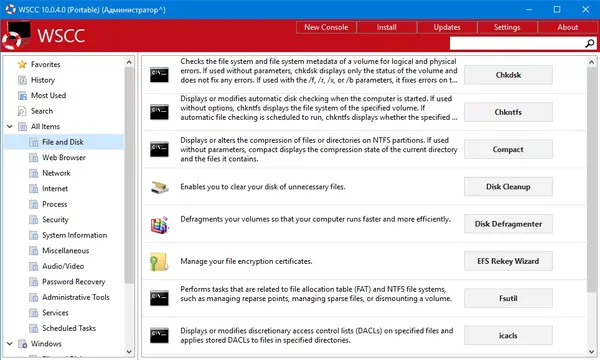
WSCC - Windows System Control Center is a utility management application designed to organize, access, and maintain various Windows system tools from a single interface. It allows users to install, update, launch, and manage utilities from supported system tool collections without manually handling each application separately.
The software provides a centralized environment for working with troubleshooting, monitoring, and maintenance utilities. It can download supported tools through available protocols, organize them into categories, and provide quick access to frequently used system applications.
WSCC features a simple interface based on folders and information panels, making it suitable for both experienced administrators and users who need convenient access to Windows maintenance utilities. It also includes search, favorites, and console access functions for improved tool management.
Key Features:
- Install and update supported system utilities automatically.
- Organize multiple utility suites in a single management interface.
- Launch and manage Windows troubleshooting and maintenance tools.
- Download and run supported programs through HTTP protocol.
- Browse utilities using folder structure, icons, or report views.
- Search tools online and view application properties.
- Add frequently used utilities to favorites.
- Access command-line applications through the integrated console.
- Customize console appearance including background, opacity, and font settings.
- Configure update checks, tooltips, and search options.
Why Choose WSCC - Windows System Control Center:
WSCC provides a practical way to manage collections of Windows system utilities from one location. It reduces the effort required to locate, update, and launch individual tools while keeping commonly used maintenance applications organized.
The software is useful for system administrators, IT professionals, and advanced Windows users who regularly work with diagnostic, monitoring, and maintenance utilities.
System Requirements:
Windows 7, 8/8.1, 10, 11
Home Page
Code:
http://www.kls-soft.com/Recommend Download Link Hight Speed | Please Say Thanks Keep Topic Live
Rapidgator
2ffqo.WSCC..Windows.System.Control.Center.10.0.4.0.Commercial.rar.html
UploadCloud
2ffqo.WSCC..Windows.System.Control.Center.10.0.4.0.Commercial.rar.html
FreeDL
2ffqo.WSCC..Windows.System.Control.Center.10.0.4.0.Commercial.rar.html
FileServe
2ffqo.WSCC..Windows.System.Control.Center.10.0.4.0.Commercial.rar.html
Links are Interchangeable - No Password - Single Extraction

