
XnConvert 1.112.0.0 (x64) Commercial Multilingual Fast Links | 24.7 Mb
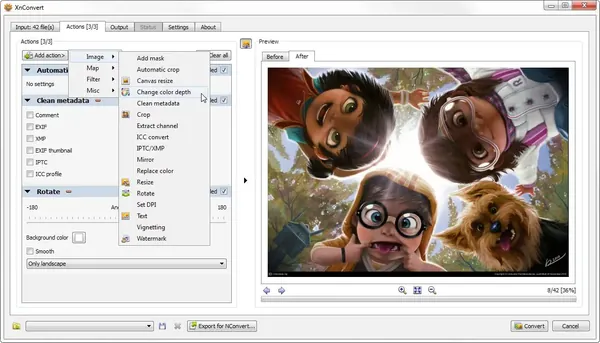
XnConvert is a versatile batch image processing application designed to help users convert, edit, and optimize large collections of photos and graphics with minimal effort. Built for speed and efficiency, it allows photographers, designers, and everyday users to automate repetitive image-editing tasks and process hundreds or even thousands of files in a single operation.
The software supports a wide range of image formats, including popular standards and professional file types such as JPEG, PNG, TIFF, GIF, WEBP, PSD, JPEG2000, OpenEXR, HEIC, PDF, DNG, CR2, and various camera RAW formats. Its batch-processing capabilities make it an excellent solution for preparing images for websites, archiving, printing, or professional workflows.
With an extensive collection of editing tools and effects, XnConvert enables users to resize, crop, rotate, enhance, filter, and watermark images while preserving productivity through automated processing. Custom workflows can be created and applied automatically to new or updated files, simplifying recurring image management tasks.
Key Features:
Windows XP, Vista, 7, 8/8.1, 10, 11
Home Page-
Key Features:
- Batch convert multiple images simultaneously
- Support for numerous image and graphics formats
- Automate processing of large photo collections
- Resize, crop, rotate, and transform images
- Adjust brightness, contrast, and saturation
- Apply sharpening, blur, and emboss filters
- Add watermarks and visual effects
- Create masking and vignetting effects
- Edit and manage image metadata
- Combine multiple operations into a single workflow
- Process camera RAW image formats
- Support for PDF and professional image files
- Watch folders for new or modified images
- Automatically apply predefined editing actions
- Compress images for storage or web publishing
- Cross-platform batch image processing solution
Windows XP, Vista, 7, 8/8.1, 10, 11
Home Page-
Code:
https://www.xnview.com/Recommend Download Link Hight Speed | Please Say Thanks Keep Topic Live
Links are Interchangeable - No Password - Single Extraction

