
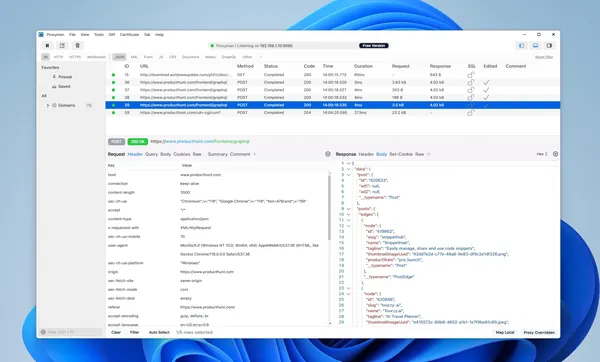
Free Download Proxyman 3.16.1 | 134 Mb
Proxyman is a network debugging application designed to capture, inspect, and analyze HTTP and HTTPS traffic. It helps developers monitor communication between applications and web servers by providing tools for viewing requests, responses, and network data.
The software is useful for developers, testers, and IT professionals who need to troubleshoot web applications, APIs, and network-related issues. Proxyman provides an interface for examining encrypted HTTPS traffic, filtering network activity, and modifying requests or responses during testing.
Proxyman includes debugging tools for analyzing modern application traffic, including support for GraphQL requests, breakpoints, and custom request handling workflows.
Software OverviewProxyman provides a set of network inspection tools for capturing HTTP and HTTPS traffic between applications and servers. It works as an intermediary proxy that allows users to view request and response details in a readable format.
The application helps identify network issues by providing filtering options based on protocols, content types, URLs, headers, and response data. Developers can inspect traffic patterns and modify data during testing without changing application source code.
Proxyman also includes specialized debugging features for GraphQL requests and tools for creating custom traffic modification rules.
Key Features
- Captures HTTP and HTTPS traffic
- Decrypts HTTPS requests and responses for inspection
- Provides network debugging tools
- Supports multiple filtering conditions
- Analyzes request and response headers, bodies, and URLs
- Provides GraphQL request debugging
- Includes breakpoint tools for modifying traffic data
- Supports changing URLs, headers, body content, status codes, and raw messages
The software provides a centralized environment for monitoring HTTP and HTTPS activity with tools for filtering and modifying network data.
System RequirementsSystem requirements were not provided in the source article.
Frequently Asked QuestionsWhat is Proxyman used for?Proxyman is used to capture, inspect, and debug HTTP and HTTPS network traffic between applications and servers.
Can Proxyman inspect HTTPS traffic?Yes. Proxyman supports HTTPS traffic inspection through its traffic capture and decryption features.
Who uses Proxyman?Proxyman is commonly used by developers, testers, and IT professionals for network debugging and application analysis.
Home Page
Code:
https://proxyman.com/Product Information
- Software Name: Proxyman
- Version: 3.16.1
- Languages: English
- License type: Full Version
- File Size: 134 Mb
Recommend Download Link Hight Speed | Please Say Thanks Keep Topic Live
Rapidgator
k02n0.Proxyman.3.16.1.rar.html
UploadCloud
k02n0.Proxyman.3.16.1.rar.html
DDownload
k02n0.Proxyman.3.16.1.rar
FreeDL
k02n0.Proxyman.3.16.1.rar.html
Links are Interchangeable - No Password - Single Extraction

